Thursday, 10 April 2014

Here Iwant To Say About Yhe How To Turn Off The Bitter Locker To Unlock The Drive

  • First of all Go to The Control Panel In your pc/laptop by pressing window buuton
  • Now select the System & Security
  •  in that window we have 7th Option Has one Bit Locker Drive Encryption select on that
  • a new window is opened in that we can see our drives with one separate option like  Unlock Drive click on that
  • after click on that its pop a window lik below
  • Enter you password in that window
  • Then the unlocking will be proceesed 
if u like this post plzz give me ur likes and share to others and give comments also

Wednesday, 9 April 2014

The RAM is "random access memory" Is the Main Memory of our device which execute each and every process perform. More our device ram more the speed of run time means Ram is only memory which took load of all the processes occur just like we run any application, music file, game all these things are run in temporary memory. RAM if you run number things at same time then you may face not responding problem just because RAM , Paging and cache memory is lesser that your current apps requirements. But not any easy part to upgrade your ram its also costly.
Don't worry here is concept if Virtual memory means You can increase your RAM just by using any device as virtual Ram. This virtual not have same performance as compare to your actual device ram but this concept increase Paging memory and some other functioning which means your overall performance become good and Some application also easily smart running without any not responding issue.

Method To Make Flash/Pen Drive Virtual Ram


Method 1st:- Virtual Ram Concept For Window XP, 7 and 8

  • First of all Insert Your Pen Drive
  •  Then open "My computer" and Right click >> Then open "Properties".
  • Now Properties window will appear, then click on "Advanced system settings"from left side.
  •  First of all Insert Your Pen Drive 
  •  Then open "My computer" and Right click >> Then open "Properties". 
  • Now Properties window will appear, then click on "Advanced system settings" from left side.


 Process of Increasing Virtual Ram
  •       After click Change Button "Virtual settings" will appear.
  • Now unchecked the box of  "Automatically Manage Page size feature"
  • Then in Custom  size Add Your Pen Drive current same in below format.

Note:- If Your Pen Drive is of Size 4Gb then always add 10Mb less from current available size. As i am using pen drive of size 4Gb and current space available is 3700 Mb then use 3690 minimum approx or remove more as you can because it better of device safety.
  • Now Add same "Value" in both boxes and click on Apply button.
  •  Restart Your PC or Laptop and Now pen drive work as "Virtual Ram". 
Important:- If you face problem in above method then can also follow below method which is easy to perform and work on Window 7, 8 

Method 2nd:- Steps of Ready Boost concept only for Windows 7, 8


  • Firstly Insert your "Pen Drive" >> Now Right click on your pen drive.
  • Open "Properties" >> Then "ReadyBoost" Tab.
  •  Then switch to "Use this device" and reduce your current memory space. If your current device place is 3700MB then reduce it with approx 200-300MB.
  • Then click on Apply button and all Done.
    In case if you want to change back your pen drive to normal then switch it back Don't use device in Readyboost tab


Important Recommendations:-

Always Safely Eject Your Pen Drive. Direct remove removal may leads to device damage.
In Virtual Memory method If you want to convert back your Pen into Normal Then Again open Virtual Settings And Remove custom memory value and choose Default settings by checking "Automatically Manage Paging Size"
In ReadyBoost method don't forget to revert back to normal or otherwise open your pen drive and delete Readyboost file from your pen drive.

I Hope You enjoy both method Virtual Ram method and Readyboost method and find them helpful and knowledgeable. If you know any better method for Increasing ram must share your ideas in below comments.

Friday, 4 April 2014


click here to view

HYDERABAD: In an attempt to empower close to 4.3 lakh adult disabled people in the state, government bodies are now trying to train them in entrepreneurial skills so that they can live a life of dignity.

A pilot project has been proposed to provide vocational training to physically-challenged people so that they can start their own businesses such as mobile repair shops, stationery shops and manufacturing of clothes and footwear. Over 3,500 people in rural areas have already been trained to earn their own living.

"We are reaching out to the disabled people in more than 700 mandals of the state. These livelihood programmes will enable them to enter the professional mainstream," said A Murali, additional CEO, Society for Elimination of Rural Poverty (SERP).
After a long campaign, a GO was issued recently which extended entrepreneurial incentives under the Industrial Investment Promotion Policy to the differently-abled at par with incentives given to scheduled castes and scheduled tribes. As per the GO, disabled people persons seeking to start their own businesses will be eligible for subsidies on land, power, skill upgradation etc. Further, women entrepreneurs will be eligible for an additional 5% investment above the 35% offered to men.

"Many physically-challenged people approach us to discuss how they can start their own enterprise, but are often unable to proceed because of specific guidelines. With the GO, there is finally some assistance," said Malla Reddy, assistant director of Andhra Pradesh Vikalunga Co-operative Corporation.

While the state's welfare department has tried to make an inclusive professional system for the physically-challenged by employing over 14,000 persons in government jobs, many continue to remain unemployed due to lack of opportunities. "There are only a certain number of vacancies available in government jobs. However, there is no limit or restriction for entrepreneurial enterprises. It should be encouraged and implemented to boost the quality of lives of the disabled people ," said Amruth Reddy, president, Differently-abled employees of Andhra Pradesh.


    THANKS TO FREEJOBALERT.COM

    Friday, 28 March 2014

    Hello friends, here is the funny trick to view any webpage in 3D mode in your web browser. To view webpage in 3D you need to have installed Mozilla Firefox or Google chrome. After follow this trick you will able to view any webpage in 3D which will amaze you and your friends. This is a simple and small tricks. To do that you don’t need to have any technical knowledge. So check how to view webpage in 3D.


    3D view webpage in google chrome:
    If you are using Google Chrome as your web browser then you need to install an extension called 3D view for webpages in your browser, because there is no inbuilt features for 3D viewing in chrome.
    First of all open your Chrome browser and install the extension called 3D view for webpages.
    After adding the extension in your browser, open any webpage.
    Now go to top right of your browser and you will see a 3D box icon and just click on it.

    3D view webpage in firefox:
    Firefox is well known and best web browser in the world. If you are using Firefox then you can use this trick without installing any add-on because Firefox have inbuilt feature called Web console which will help you to view a webpage in 3D. Now follow the steps as given below.
    Open Firefox and open any website page such as Google.com, Facebook.com or other as your wish.
    After opening full webpage then press Ctrl + Shift + K and it will open Web Console option at bottom of that webpage.
    Now go to right side of web console option and you will see a 3D box at top right side. If you hover your mouse on it then it show you 3D view. Just click on that 3D box.

    Now your current web page turns into a 3D web page. Now dragging the page with your mouse and you will see the page in 3 dimension.


    NOTE: If this option didn't worked for you then install Tilt 3D add-on in your browser and then try to view web page in 3D.
    <h1> FREE DOWNLOAD OPTIONS OF YOUTUBE VIDEOS </h1>
    FREE DOWNLOAD OF YOUTUBE VIDEOS
    YouTube is the most popular video shearing web site. you can get your desired any kind of video inside this web site. but it is a great problem that is this site has no direct video download options. so you can not download any video directly. somebody use some video downloader plugins in there web browser and somebody use some downloader software like IDM to download there YouTube videos. But software or plugins use is not easy way. So, this tutorial I will show you how to download YouTube video without any software or plugins.
    Read also:

    torrent files to idm

    HOW TO DOWNLOAD YOUTUBE VIDEOS

    I will show step by step process
    Go to any youtube video u want
    Then type the "savefrom.net" or "sfrom.net" or "ss" before the url of youtube video like this Example:sfrom.net/http://www.youtube.com/watch?v=3mEjNGh9N5A
    u can also use short domain names like
    ssyoutube.com
    Example:www.ssyoutube.com/watch?v=3mEjNGh9N5A
    u can see screenshots like this
    now choose the format of the video. it is in the right side of page
    download the video

    ANOTHER WAY OF DOWNLOAD


    Go to
    http://www.savefrom.net
    then paste the url of youtube video.select the format of video.you can download the video
    like follow the screen shots
    you are done.
    enjoyyy
    LIKE OUR PAGE HERE.

    funny trick

    This is a funny trick

    Change the screen upside down type
    *#5513#
    on the main screen
    Change the screen to anti-clockwise direction type
    *#5512#
    on the main screen
    Change the screen clockwise type
    *#5514#
    on the main screen
    Change the screen to its normal mode type
    *#5511#
    on the main screen
    If u have any problem repeat the same code again
    This is just for fun
    LIKE OUR PAGE HERE.

    Thursday, 27 March 2014


    What are Basic Disk and Dynamic Disk ?


    Basic Disk : Primary Partition,Extended Partition,Logical Drives


    Basic Disk and Dynamic Disk are generally the two types of hard disk configuration in Microsoft Windows.A Basic Disk Consists of Primary Partition that is used for the storage of Windows Files , Extended Partition and Logical drives for organizing the data.Basic Disks provides a simple storage solution for storing the files and it supports clustered disks,IEEE 1394 disks and USB Removable Drives.Basic disks makes use of MBR (Master Boot Record) Partition style similar to the disks used by Microsoft MS-DOS Operating Systems.It also supports GPT (GUID Partition table). Most of the Personal Computers makes use of Basic Disks because they are very simple to manage where you can extend your primary partition and logical drives space with simple clicks.

     Some Common Operations applicable to Basic Disk only :


    • You can easily create or delete your Primary and Extended Partitions
    • You can create or delete the logical drives
    • You can format the partitions and make them active

    Dynamic Disk : Volume Management


    Dynamic Disk consists of large number of dynamic volumes around 2000 that works very similar to the Primary Partitions as used in Basic Disk.Dynamic Disk are mostly used by Advanced IT professionals to increase the performance and reliability of the computer.Dynamic Disks also supports both MBR (Master Boot Record) Partition style and GPT (GUID Partition table) similar to the basic Disks.Dynamic Disk have the ability to create volumes so that can span Multiple Disks.Dynamic Disks provides great Flexibility in Volume management because they make use of database in order to track the information of dynamic volumes located on the disk.Dynamic Disk allows volumes to have a non contiguous extents on one or more physical disks.LDM(Local Disk Manger) and VDS(Virtual Disk Service) are the main basis of Dynamic Disks and its volumes providing you with features to change Basic Disks into Dynamic Disks or Vice-versa and allows you to create fault-tolerant volumes.

    Some Common Operations applicable to Dynamic Disk only :


    • You can create and delete all types of volumes like Simple,RAID-5,Mirrored,Spanned,Stripped
    • You can easily extend any Stripped or Spanned Volume
    • Repair any Mirrored or RAID-5 Volumes
    • You can Reactivate any missing or offline Disk

    Common Operations Applicable to Both Basic Disk and Dynamic Disk:


    • Both of Basic Disk and Dynamic Disks supports MBR (Master Boot Record) Partition style and GPT (GUID Partition table)
    • You can Check Disk properties in both Basic Disk and Dynamic Disks like – Free space,Capacity,Current Status etc
    • Convert Basic Disk into Dynamic Disk or Convert Dynamic Disk into Basic Disk
    • Create Drive Letters in both Basic Disk and Dynamic Disks for the partition or disk volumes and for CD/DVD-ROM
    • View Partition Properties (like offset, length, type etc) as well as Volume Properties (like label, type, Win32 path name etc)

    Basic Disk and Dynamic Disk Difference : Major Differences


    • Dynamics Disks are supported with Multipartition Volumes where you can create the volumes whereas Basic Disks do not possess this property
    • Basic Disk Partition Information is stored in the Windows Registry Whereas Dynamic Disks Information is stored on the disk itself
    • Dynamic Disk Volumes consists of noncontinuous extents on one or more physical disks


    Windows 7 provides Flexible options for the conversion of Basic Disk into Dynamic Disk using the Disk Management Utility Software.Before You convert Basic Disk into Dynamic Disk you must Note the Following Points.Basic Disks are mostly used in Personal Computers whereas Dynamic Disks are used in IT Industry field related computers.Know more about What are Basic Disk and Dynamic Disks ?

    Points to Remember Before Converting Basic Disk into Dynamic Disk :


    1) Make Full Back-up of your hard disk before you convert it to Dynamic Disk


    2) After Converting Basic Disk into Dynamic Disk Windows 7 will Read it but it may happen that other operating Systems will not read it and this process is irreversible
    3) Some Portable Computers don’t Support Dynamic Disks


    4) If you want to change the format of the disk and want to return back to basic then you should need to create back the partitions on the drive again

    Follow these steps to Convert Basic Disk into Dynamic Disk

    1) First of all you need to open Disk Management Utility in Windows 7.To open it follow the below given steps


    • Go to Start and then Go to Computer and then do a Right-click there and select Manage as shown below
               Start->Right Click Computer -> Select Manage
    •  Now a new Window will open and there select Disk Management as shown below
    •  Now Select the Disk that you want to convert it to Dynamic Disk and Right Click on that disk as shown below
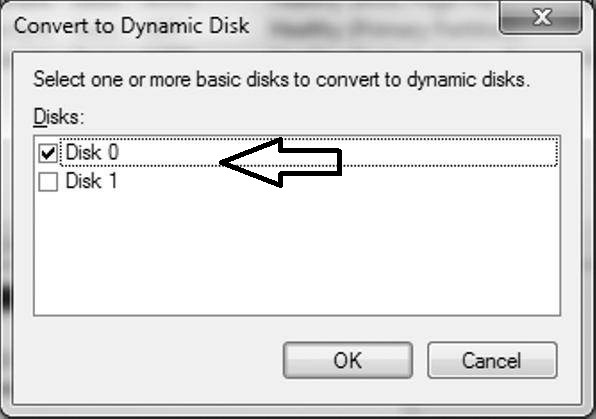
    •  Mark the Disk that you want to convert and Click OK
    •  Again a new Window will open showing you the disk that you have selected to convert and there click Convert
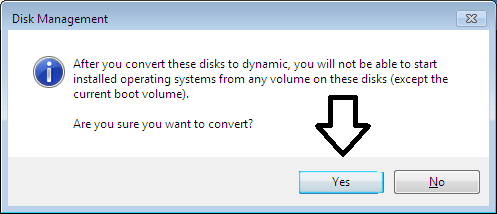
    • Now a Warning Message will appear stating that you will not be able to start installed operating systems from any volume on these disks(except the current boot volume) as shown below
    • Click on Yes and You are done
    • You have Successfully changed your Basic Disk into Dynamic Disk


    * If during Conversion you encounter an error like this”Pack name is invalid” then here is a simple fix to solve this error


    This is a very common problem that is faced by most of the users while using the Disk Management Utility in Windows Vista , Windows 7 or in Windows 8.You might face an error like “pack name is invalid” while converting Basic Disk into Dynamic Disk using the Windows Disk management Utility and is a very known common Microsoft Windows issue. Basic Disk and Dynamic Disk are the type of hard disk configuration in Microsoft Windows. A Basic Disk makes use of Primary partition for the storage of Windows files , Extended Partitions and logical drives for organizing the data whereas Dynamic disk consists of large number of dynamic volumes about 2000 volumes that works like Primary partition Drives as use on Basic disks. Generally personal computers uses Basic Disks whereas Dynamic disks are used in IT industries by professional users. “pack name is invalid” error generally occurs when you use NON-ASCII characters for your Computer’s name and thus this error is commonly found in Countries like China or Japan. Also found in Korean computers because they generally tend to use NON-ASCII characters. You may also face this error while using one or more double-byte characters. Therefore Microsoft Recommends using only ASCII characters for the name of your computer or files or folders etc. So here is a simple solution to solve this error and hence convert your basic Disk into Dynamic Disk easily.Know more about Basic Disk and Dynamic Disks What are Basic Disk and Dynamic Disks KnowHow to convert Basic Disk into Dynamic Disk

    Fix Pack name is invalid Error :


    1) First of all you need to open the System Properties of your computer. You can open the System properties by typing the command sysdm.cpl in RUN DIALOG BOX. Press Win(Windows) + R to open the RUN DIALOG BOX

    *Alternatively you can open the system properties by going to Computer and then do a right click and then select Properties as shown below
    • Then a new Window will open where on the left hand side you see option like Device Manger, Remote settings, System Protection, Advanced System settings as shown below


    • Now choose Advanced System settings and then it will open system Properties Windows as shown below
    •  Now select Computer Name and Click on Change button as shown below
    •  Now type a New name for your Computer and make sure to don’t type any NON-ASCII characters or double byte character. Just type any simple Computer name without using the NON-ASCII characters
    •  Apply the changes and Click OK
    •  Now Restart your computer so that the effects can take place
    •  You have now successfully fixed “pack name is invalid” error and now you can convert your Basic Disk into Dynamic Disk


    Hide Hard Drive in Windows 7/Vista/XP  Using Group Policy Editor


    • First of all Go to RUN and Open Group Policy Editor.Type ‘gpedit.msc’ in RUN Dialog Box to Open Group Policy Editor


    • Now Go to User Configuration and Select Administrative Templates as shown below in the Image
    • After Selecting Administrative Templates  on the Right Hand Side You Will See ‘Windows Components’ Folder and Double Click on that Folder as shown below in the Image
    • Scroll Down to the Bottom and Search For the Folder ‘ Windows Explorer’ and Double Click on that Folder as shown below in the image
    • Now Search For the Policy ‘Hide these Specified drives in My Folder’ and Double Click on that as shown below in the Image
    • Select the Enabled Option and Select the Partitions that You Want to Hide Under the Option ‘Pick one of the Following Combinations’ as shown below in the Image
    • You are all Done and You Have Successfully Hide Hard Disk Partitions

    Hide Hard Drive in Windows 7/Vista/XP Using Command Prompt

    • Run Command Prompt as an Administrator.You Must RUN Command Prompt as an Administrator to Use this Method Else it will not Work
    • Now Type the Following Commands One by One as Shown below in the Image
    • Type ‘diskpart
    • Type ‘list volume
    • Type ‘select volume 7‘ (Note - Select the Volume/Partition That You Want to Hide Here I want to Hide the M Label Partition )
    • Type ‘remove letter m
    • It will Now Make Your M Label Drive Inaccessible and Will be Hidden
    Note :- You Can Unhide the Same Drive by Using the Command ‘assign letter m’ after Following all the Commands Upto Selection of Volume as shown in the above Image

    Hide Hard Drive in Windows 7/Vista/XP Using Registry Editor


    • Go to Run and Type ‘regedit’ in RUN Dialog Box
    • Now Search For the Key  – HKEY_CURRENT_USER\Software\Microsoft\Windows\CurrentVersion\Policies\Explorer
    • Now You Need to Create a New DWORD (32-bit) Value by Right Clicking in the Right Pane as Shown below in the Image
    • Give a Name to the New Key i.e Hide Drives Or No Drives etc and Double Click on that
    • Now Switch to Decimal Mode and Type the Value to Hide the Specified Drive i.e To Hide Drive B type 2 in the Value Field As Shown Below
    • A: 1
    • B: 2
    • C: 4
    • D: 8
    • E: 16
    • F: 32
    • G: 64
    • H: 128
    • I: 256
    • J: 512
    • K: 1024
    • L: 2048
    • M: 4096
    • N: 8192
    • O: 16384
    • P: 32768
    • Q: 65536
    • R: 131072
    • S: 262144
    • T: 524288
    • U: 1048576
    • V: 2097152
    • W: 4194304
    • X: 8388608
    • Y: 16777216
    • Z: 33554432
    • ALL: 67108863
    Note:- If You want to Hide More Than One Drive then Enter the Sum of all the Values of the Drives For Example – If you Want to Hide Drive A,D,E then Type 25 (1+8+16) in the Value Field

    Hide Hard Drive in Windows Using Third Party Software


    You can Also Use Third Party Software’s to Hide Hard Disk Partitions in Windows.Here below is Some List of Free Tools to Hide Hard Disk Partition in Windows

    Wednesday, 26 March 2014


    I can’t believe it, but it seems that the trend of introducing a “mini” version of an existing device has moved on from the world of smartphones over to the digital camera environment. This time around, it would be South Korean conglomerate Samsung that flies the flag, having introduced their latest ‘star’, which is the all new Samsung NX mini SMART camera, which somewhat brings back memories of the likes of the Samsung Galaxy S3 mini and its ilk. The Samsung NX mini is touted to be the world’s slimmest and lightest interchangeable-lens camera, where the body tips the scales at a mere 158 grams, with an extremely slim 22.5mm design.
    Just what can shutterbugs expect from the Samsung NX mini? Well, for starters, it will come with a 75.2mm (3.0-inch) Flip up and Touch Display that can flip itself 180-degrees around, not to mention accompanied by a 20.5MP BSI CMOS Sensor, 6fps Continuous Shot, and 1/16000 sec Shutter Speed among others. Of course, what good is a camera’s body if it does not have the appropriate type of lens to go along with it? This is why Samsung has not forgotten about this extremely important aspect, which is they they will also introduce a trio of NX mini lens (NX-M) in the form of the NX-M 9mm F3.5 ED lens, NX-M 9-27mm F3.5-5.6 ED OIS lens, and NX-M 17mm F1.8 OIS lens.
    Samsung intends to market the Samsung NX mini as a “go-to” device for great photography, letting users shoot special moments in stunning detail. Apart from that, it will also boast of NFC and Wi-Fi capabilities, so that users can capture impressive shots which can then be shared quickly and easily, allowing friends to enjoy it in real time. With a solid premium metal body alongside a luxurious leatherette finish, you can be sure that it does not look cheap – far from it. The fashionistas would also not mind carrying this around as it comes in five different colors (white, pink, mint green, brown and black) so that users are able to choose the color that best suits their style.

    The Slimo iPhone Charging System removes cables from the equation


    As much as we’d like to think we always wrap our cables before shoving them in our bag (which is certainly well-organized to begin with), we sometimes forget. Of course, that leads to a tangled mess that doesn’t necessarily take a long time to undo, but is pretty annoying to deal with. Probably because we have to do it multiple times with various charging cables, headphones, and more.
    If you’d prefer to start cutting down on the amount of cables you have to keep track of, then the Slimo can help. This is a wireless charging system that plugs into the 8 pin lightning connector on your iPhone 5, 5c, 5s, and iPad or iPod 5th gen. Once it is plugged into your device, simply adhere the super thin Slimo receiver to the back, and use with any QI-marked transmitter. This will streamline the charging process, and save you from having to wrestle with cables.
    Getting just the receiver will cost you around $30, and getting a set with both the receiver and a power bank 5000mAh transmitter will cost around $69. You can use a case while charging your iDevice with this, so long as it’s not made of any aluminum or metal. If you already have all the cables and ability to wrap them, then this won’t really be necessary, but those interested know that they’re putting money down for convenience.

    If you live just close enough to work that walking would be a pain, there’s a good chance you use a train, bus, cab, or your own method instead of hoofing it. It’s not that walking is a terrible thing, it just often takes up more time or energy than we have in the mornings. If using a bicycle or skateboard is a bit too labor-intensive for you, but you’d rather rely on your own ways of getting to work, there are options out there that require little effort from you.
    While a Segway is a valid option, it’s mainly meant for sidewalks, and in all honesty looks a bit silly. If you’ve ever considered a motorbike, but don’t want to have to pay high prices for gas, then the FEDDZ might seem fairly appealing. This is a an electric motorcycle that is closer in size to a bicycle, but has no pedals to fuss with. There are front and rear lights as well as turning signals, and the entirety of this bike runs off of a Lithium-ion battery, which takes about 4-5 hours to recharge after it has been drained. It is easy to remove, and has no cables to get tangled. Simply remove, plug into a wall outlet, replace, and be on your merry way.
    There are two different types of bikes available, the lower end of the spectrum being able to go about 16mph, and the higher end being able to go 28 miles per hour. In either category, there are options for the battery which are called Eco and Premium, which have around a 44-68 mile driving range respectively. On any bike, there are three speed options to choose from, a display to show you your speed, time, and distance, as well as brakes on the handlebars. The prices for these e-bikes is anywhere from 
    $8,200-10,000+.